Quick answer
- Check the cloud first. Sign in at icloud.com or photos.google.com from another device. Your photos may already be safe.
- Screen broken but phone on? Back up to a computer it has trusted before. On many Galaxy phones, a USB mouse or HDMI adapter lets you get in.
- Won't turn on or got wet? Stop charging it and stop pressing the power button. Corrosion spreads while it has power.
- Never factory reset or trade it in first. A reset or a swap for a new phone can wipe out your only copy.
- A repair is often the way back in. A new screen, battery or charging port can bring the phone back long enough to save everything.
Broken phone with photos you can't lose?
Ultimate Wireless Solutions works on cracked, dead and water-damaged phones for customers across Orange County. Every phone is different, so call (949) 300-8898 or get a free quote.
Can you recover data from a broken phone?
Usually, yes. Most phones that come into our Tustin shop as "broken" have a cracked or black screen, a worn-out battery, a bad charging port or water damage. In all of those cases, the storage that holds your photos and messages is often fine. The problem is getting to it.
Here's the catch with modern phones. iPhones and current Android phones encrypt everything, and the key is tied to that phone's own processor. You can't pull the storage chip and read it in another device the way you could with an old memory card. So in practice, recovering data means getting the original phone working well enough to unlock it and copy your files off.
The odds drop when the main board is cracked, when water sat inside for a long time, or when the phone was factory reset.
Step 1: Check whether your data is already backed up
Before you spend anything, find out what's already saved.
iPhone
- iCloud Photos: on any computer or tablet, sign in at icloud.com and open Photos. If your pictures are there, they're safe.
- iCloud Backup: on another Apple device signed in to the same Apple Account, open your iCloud storage settings and look under Backups for your old iPhone. A new iPhone can be restored from that backup during setup.
- Other apps: check iCloud Drive, Notes and Contacts on icloud.com. WhatsApp keeps its own chat backup in iCloud.
Android and Samsung Galaxy
- Google Photos: sign in at photos.google.com with the Google account that was on the phone.
- Google backup: if backup was on, signing in to a new Android phone with the same account offers to restore apps, contacts, messages and settings.
- Samsung: if you turned on Gallery syncing or Samsung Cloud, sign in from another device to check what was saved. WhatsApp chats back up separately to Google Drive.
If everything you care about is already in the cloud, you may not need the old phone at all. You could even sell the broken phone for cash once you know nothing is left on it.
Step 2: Screen broken but the phone still turns on
If the phone still rings, buzzes or lights up, you're in good shape. The data is there, and the phone is running. You just need a way to unlock it and copy things off.
iPhone: back up to a trusted computer
- 1Plug the iPhone into a Mac or PC you've connected it to before.
- 2Open Finder on a Mac, or the Apple Devices app (or iTunes) on Windows, and select the iPhone.
- 3Choose Back up all of the data on your iPhone to this computer, then click Back Up Now. Tick Encrypt local backup to include saved passwords and Health data.
- 4Wait for the backup to finish before you unplug.
The catch: a new computer asks you to tap Trust on the phone, and the backup may ask for your passcode on the phone. If you can't see or touch the screen, that's the point where a screen repair becomes the practical way back in. If the screen ignores your touch but still shows a picture, try the steps in our guide to an iPhone touch screen not working first.
Samsung Galaxy and other Android phones
- Picture shows, touch doesn't work: connect a USB mouse with a USB-C OTG adapter. A pointer appears, so you can unlock and move around. A USB keyboard helps with your PIN.
- Screen is black: many Galaxy phones can mirror to a TV or monitor with a USB-C to HDMI adapter, or with Samsung DeX. Not every model supports video out.
- Then back it up: use Smart Switch on a computer, or turn on Google Photos backup while you have access.
Samsung explains both methods on its page about accessing your Galaxy phone's data when the screen doesn't respond.
Be careful with "broken phone recovery" software
Programs that promise to pull data from a broken phone often need it unlocked, already trusted by the computer, or set up with developer options before it broke. On a locked, modern phone they rarely help. Try the free steps above first.
Step 3: The phone won't turn on or got wet
A phone that looks dead is the riskiest case, so slow down. What you do in the next hour can decide whether your data comes back.
- 1If it got wet, don't charge it or keep pressing power. Power and moisture together cause corrosion on the board. Skip the rice. Our guide on how to fix a water damaged phone covers the first hour.
- 2If it's dry, try a different cable, charger and outlet. Leave it plugged in for up to an hour. A fully drained battery can look like a dead phone.
- 3Try a force restart. Our steps for when an iPhone won't turn on walk through it, plus the black-screen check.
- 4Don't choose Restore. If an iPhone ends up in recovery mode on your computer, pick Update, which tries to reinstall iOS without erasing. Restore wipes the phone.
- 5Don't factory reset an Android phone from its recovery menu to "fix" it. That erases the data you're trying to save.
If none of that works, stop experimenting. Every extra try on a shorted or corroded board can make things worse.
How a repair shop gets data off a broken phone
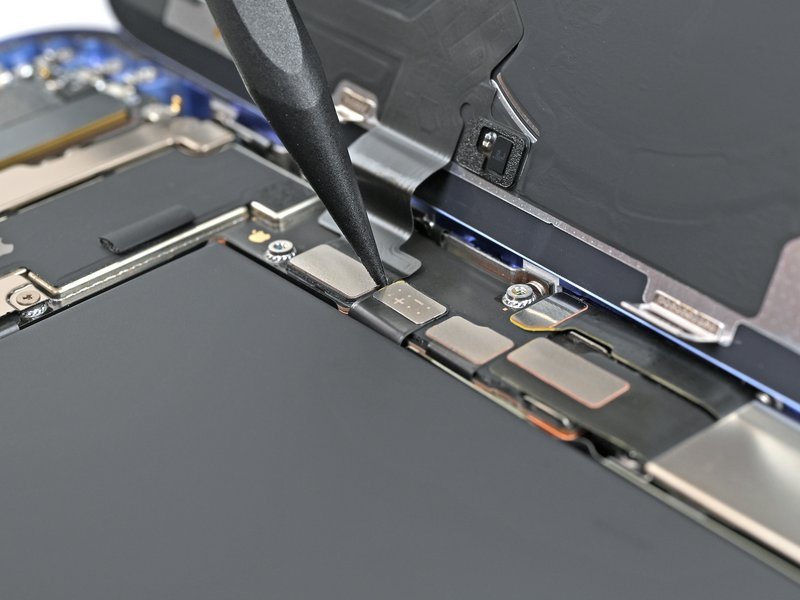
At our Tustin shop, our goal isn't to swap your phone for a new one. It's to get your phone running just long enough to back it up safely. Depending on what failed, that can mean:
- A screen replacement, so you can see, unlock and back up the phone. A screen repair doesn't erase your data.
- A battery replacement for a phone that shuts off right away or won't hold a charge.
- A charging port repair when the phone won't charge or a computer can't see it.
- Water damage repair, cleaning corrosion off the board before it spreads.
- Board-level repair when a small part on the main board has failed.
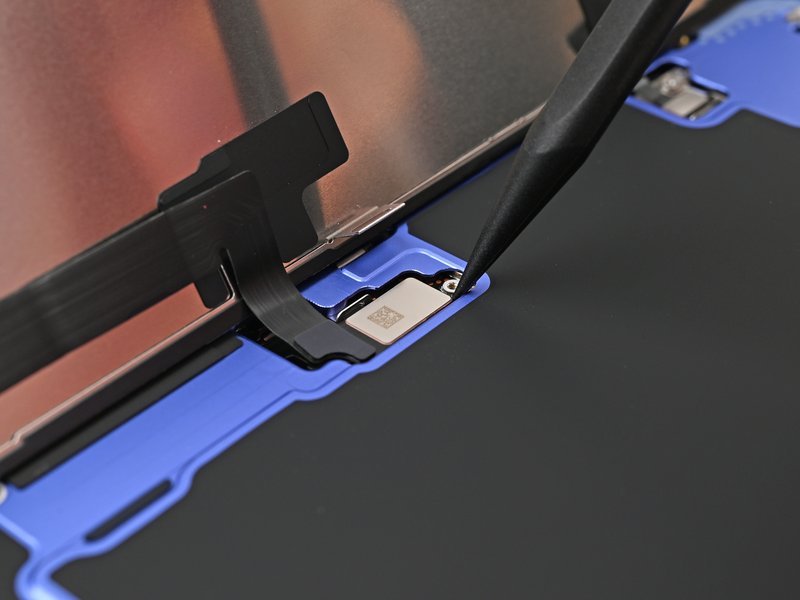
Once the phone boots, we help move your photos, contacts and files to a new phone, a computer or a drive you bring. Want to see what a screen swap involves? Our iPhone 16 screen replacement guide shows each step. It takes heat and special tools, so leave it to a technician when your data is at stake.
We'll be honest with you up front: data recovery is never guaranteed. We look at the phone first and tell you how likely recovery is before you decide anything. Our data recovery service page explains the process in more detail.
When to bring it to a pro
Book an evaluation if any of these sound familiar:
- The phone won't turn on, even after charging and a force restart.
- It got wet, or it stopped working a few days after a spill.
- The screen is black or shattered, and you don't have a backup or a trusted computer.
- It's stuck on the logo, restarting over and over, or asking to be restored.
- You need photos, videos or messages that aren't saved anywhere else.
Got your data off but the phone is done? Our data transfer and backup service can set up the new one.
FAQ: Recovering data from a broken phone
Can you recover data from a phone that won't turn on?
Often, yes. If the storage and main board are intact, fixing the part that stopped it from powering on, such as the battery, charging port or a board component, can bring it back long enough to save your data. Avoid factory resets and repeated charging if it got wet.
How do I get pictures off a phone with a broken screen?
Check icloud.com or photos.google.com first, since they may already be backed up. If not, back up an iPhone to a computer it trusted before, or use a USB mouse or HDMI adapter on many Galaxy phones. If you can't unlock it, a screen repair is usually the way back in.
Does a screen replacement delete my data?
No. A screen repair replaces the display and doesn't touch the storage where your photos and messages live. It's still smart to back up right after the repair, so you have a copy.
Can data be recovered from a water damaged phone?
Sometimes. Turn it off, don't charge it and skip the rice. The sooner the board is cleaned, the better the odds. Corrosion that sits for weeks can damage the parts needed to boot the phone.
Can you recover data from a factory reset phone?
Generally no on modern iPhones and Android phones. A reset deletes the encryption keys, so the old data can't be read. Your best option is any backup in iCloud, your Google account or on a computer.
Can a phone repair shop recover data?
Yes, in many cases. A shop can repair the screen, battery, charging port or board so the phone boots, then copy your data off. Results depend on the damage, so ask for an evaluation first. Call or get a free quote.
Need data off a broken phone? We can help in Tustin
Bring your phone to Ultimate Wireless Solutions at 18062 Irvine Blvd Suite 207, Tustin, CA 92780, or call (949) 300-8898. We help customers across Tustin, Irvine, Santa Ana, Orange, Anaheim, Costa Mesa, Newport Beach, Mission Viejo and Lake Forest. Coming from Irvine? See our cell phone repair in Irvine page for directions. Every phone is different, so call or get a free quote, or book an appointment and we'll take a look.