Quick answer
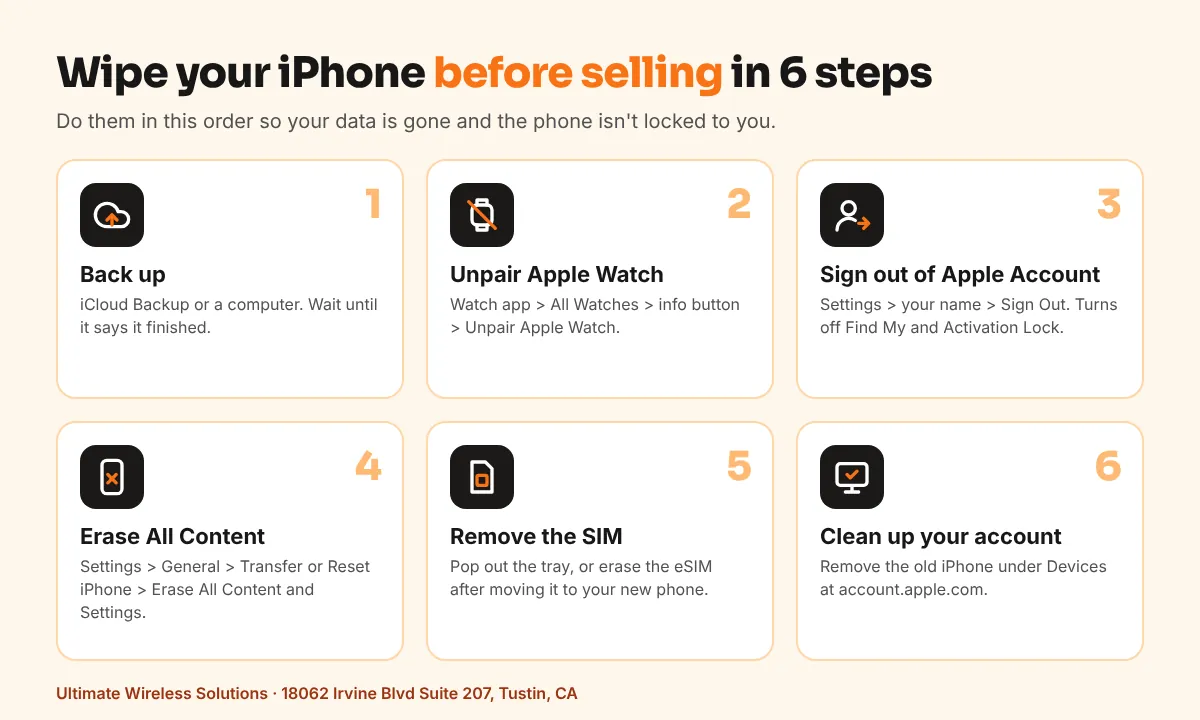
- Back up first. Erasing is permanent, so make sure your backup actually finished.
- Unpair your Apple Watch and move your eSIM to your new phone before you erase the old one.
- Sign out of your Apple Account. This turns off Find My and removes Activation Lock, which buyers check first.
- Erase the phone: Settings > General > Transfer or Reset iPhone > Erase All Content and Settings.
- Pull the SIM and clean up your account. Remove the old iPhone from your device list at account.apple.com.
Why wiping your iPhone the right way matters
At our Tustin shop we often see iPhones come in for buyback or trade that look wiped but are still linked to the owner's Apple Account. Getting this right protects two things.
- Your privacy. Photos, messages, saved passwords, Apple Pay cards, health data and email all live on the phone until it's properly erased.
- What the phone is worth. If Find My is still on, a reset iPhone asks for your Apple Account password during setup. That's Activation Lock, and most buyers won't take a locked phone. On our cash for phones page, the final offer depends on inspection, ownership verification and activation-lock removal.
How to wipe iPhone before selling, step by step
These steps follow Apple's own guidance and work on current iPhones running iOS 26 or iOS 27. Menu names can be slightly different on older versions.
- 1Back up your iPhone. Go to Settings > [your name] > iCloud > iCloud Backup and tap Back Up Now, or back up to a Mac or PC with a cable. Wait until it says the backup finished.
- 2Move your data to your new phone. Getting a new iPhone? Quick Start copies everything over while the two phones sit side by side. Switching to Android, or want help? Our data transfer and backup service can move photos and contacts for you.
- 3Unpair your Apple Watch. Open the Watch app on the iPhone, tap All Watches, tap the info button next to your watch, then tap Unpair Apple Watch. This also removes Activation Lock from the watch.
- 4Transfer or cancel AppleCare. If the phone has an AppleCare plan, transfer it to the buyer or cancel it.
- 5Turn off iMessage if you're leaving iPhone. Turn off iMessage and FaceTime before your number moves to a non-Apple phone, or texts from iPhone friends can get stuck. Apple also has an online Deregister iMessage page if you've already switched.
- 6Sign out of your Apple Account. Go to Settings > [your name], scroll down and tap Sign Out. On iOS 26 and later you'll be asked whether to erase the iPhone or sign out without erasing. On older versions, enter your Apple Account password and tap Turn Off. Signing out turns off Find My and Activation Lock.
- 7Erase All Content and Settings. Go to Settings > General > Transfer or Reset iPhone > Erase All Content and Settings. Enter your passcode and tap Erase iPhone. If you use an eSIM and aren't keeping it on this phone, choose to erase the eSIM too.
- 8Remove the SIM card. On iPhones with a SIM tray, pop it out with a SIM tool or a straightened paperclip. US models from iPhone 14 on have no tray and use eSIM only.
- 9Remove the phone from your account. Sign in at account.apple.com, open Devices and remove the old iPhone so it's no longer trusted for sign-in codes.
When the erase finishes, the iPhone restarts to the Hello screen. That's exactly what a buyer should see. If setup ever asks for your Apple Account, Activation Lock is still on and you need to sign out first.
If your iPhone makes you wait an hour
Many iPhones have Stolen Device Protection turned on. When it's on and you're away from a familiar place like home or work, signing out of your Apple Account needs Face ID or Touch ID, then a one-hour security delay, then Face ID again. Erasing the phone needs Face ID or Touch ID with no passcode fallback, and Find My can't be turned off while the feature is on. Apple explains the details in its Stolen Device Protection guide.
The easy fix is timing. Wipe the phone at home the night before you sell it, not in the parking lot. If a security delay starts, let the hour run out and then finish the steps above.
Mistakes that cost sellers time or money
- Deleting photos and contacts by hand. While you're signed in to iCloud, deleting items removes them from iCloud and every device you own. Sign out and erase instead.
- Erasing before the backup finishes. Once the phone is erased, anything that wasn't backed up is gone.
- Using a computer restore as the wipe. If you can still unlock the phone, use Erase All Content and Settings. A restore through recovery mode erases the phone but leaves Activation Lock on if you never signed out.
- Forgetting the passcode or Apple Account password. Reset your Apple Account password before you sell, not after.
- Shipping a phone before a buyer confirms. Whoever you sell to, wait for confirmation before mailing anything.
Should you fix anything before you sell?
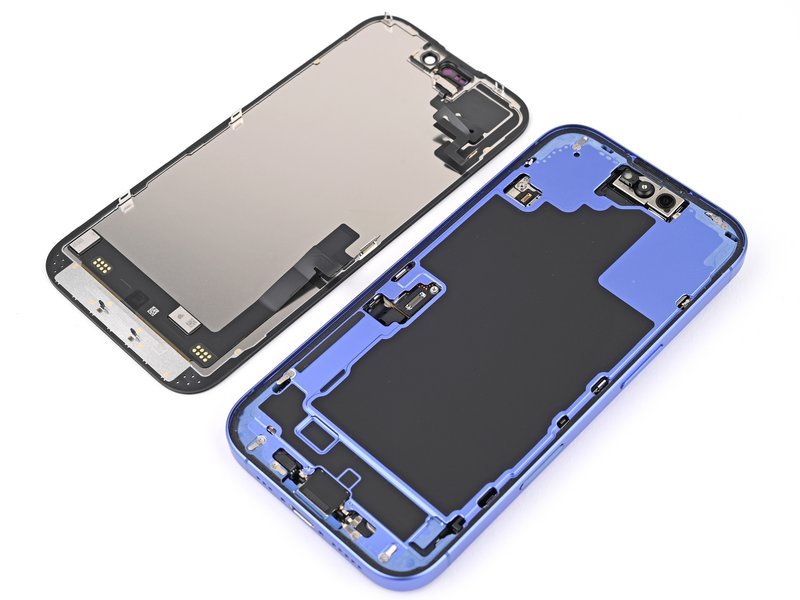
Buyers and buyback shops check more than the screen. On recent iPhones, Settings > General > About > Parts and Service History shows whether the screen, battery or camera has been replaced. Apple says that if a part shows "Finish Repair," you should complete that repair before you trade the phone in. Be upfront about any earlier repairs, since the phone gets tested either way.
Whether a repair pays off depends on the phone. A fresh battery replacement or screen repair can make sense on a newer model, while an older phone with a cracked screen is often worth more sold as-is. Our guide to selling your phone for cash walks through that decision, and we're happy to give you a free quote on both options.
Selling an Android phone instead?
The idea is the same: back up, remove your accounts, then reset. Removing your Google account (and your Samsung account on a Galaxy) first matters, because Factory Reset Protection can lock the next owner out otherwise.
- Samsung Galaxy: Settings > General management > Reset > Factory data reset.
- Google Pixel: Settings > System > Reset options > Erase all data (factory reset).
- Both: Take out the SIM card and any microSD card before you hand it over.
When to bring it to a pro
Most people can wipe their own iPhone in a few minutes. Bring it in, or call first, if:
- The screen is cracked or touch doesn't work, so you can't get into Settings.
- You forgot the passcode. The phone can be erased through recovery mode, but you'll still need your Apple Account password to clear Activation Lock.
- The phone won't turn on and still has photos you want. Our data recovery team can often help before it's wiped.
- You bought the phone used and it's still tied to someone else's account. Only the original owner can remove Activation Lock, so contact the seller.
- You're not sure whether it's carrier locked. Our guide on how to check if your iPhone is unlocked shows you in seconds.
Coming from Santa Ana? See our Santa Ana cell phone repair page for directions to the Tustin shop.
FAQ: wiping an iPhone before you sell it
Does a factory reset remove my Apple ID?
It does if you sign out first, or erase from Settings and enter your Apple Account password when asked. That turns off Find My and Activation Lock. A phone restored through a computer or recovery mode without signing out still asks for your Apple Account password during setup.
Should I take out my SIM card before selling my iPhone?
Yes. Remove the physical SIM if your iPhone has a tray. For an eSIM, move it to your new phone first, then choose to erase the eSIM when you erase the old iPhone. US models from iPhone 14 on use eSIM only.
Does erasing my iPhone delete my iCloud photos?
No. Erasing the iPhone doesn't delete anything stored in iCloud. Deleting photos by hand while signed in does remove them from iCloud, so sign out and erase instead.
Can someone recover my data after I erase my iPhone?
Not after Erase All Content and Settings. iPhones encrypt their storage, and erasing removes the key, so the old data can't be read. That's why erasing is safer than deleting files one by one.
How do I remove my Apple ID from an iPhone I already sold?
Sign in at iCloud.com, open Find Devices, select the iPhone and remove it. Then remove it from your device list at account.apple.com and change your Apple Account password.
Do I need to wipe my iPhone before trading it in?
Yes. Carriers, Apple and buyback shops all need Find My turned off, and you should never hand over a phone with your data on it. Follow the same steps before any trade-in.
Selling your iPhone in Orange County?
Once your phone is wiped, bring it to Ultimate Wireless Solutions at 18062 Irvine Blvd Suite 207, Tustin, CA 92780, or call (949) 300-8898. We buy phones through our cash for phones service and handle iPhone repair for customers across Tustin, Irvine, Santa Ana, Orange, Anaheim, Costa Mesa, Newport Beach, Mission Viejo and Lake Forest. Every phone is different, so call or get a free quote, or book an appointment if you'd like help wiping it.