
Quick answer
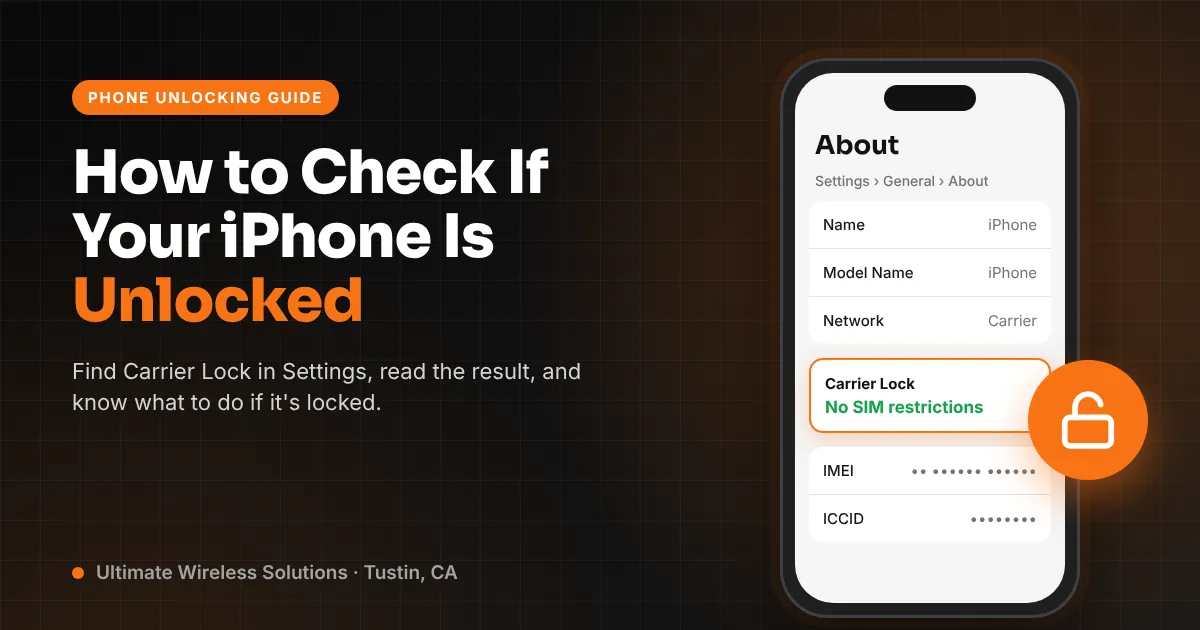
- Check Settings: go to Settings > General > About and find Carrier Lock.
- "No SIM restrictions" means unlocked. Anything else, like "SIM locked," means the iPhone is locked to a carrier.
- Apple can't unlock it. Apple says only your current carrier can unlock your iPhone.
- Unlocked isn't the same as clean. Activation Lock and a blocked IMEI are separate checks, especially on a used phone.
- Seeing "SIM not supported"? The phone is probably locked to another carrier, or an approved unlock hasn't finished yet.
How to check if iPhone is unlocked in Settings
This is the quickest and most reliable check, and it's the one Apple points to. You don't need to call your carrier or borrow a SIM card from anyone.
- 1Open the Settings app.
- 2Tap General, then tap About. About is the first item on the General screen.
- 3Scroll down to Carrier Lock. It's toward the bottom of the About screen.
- 4Read the result. "No SIM restrictions" means the iPhone is unlocked. "SIM locked" or any other message means it's still locked to a carrier.
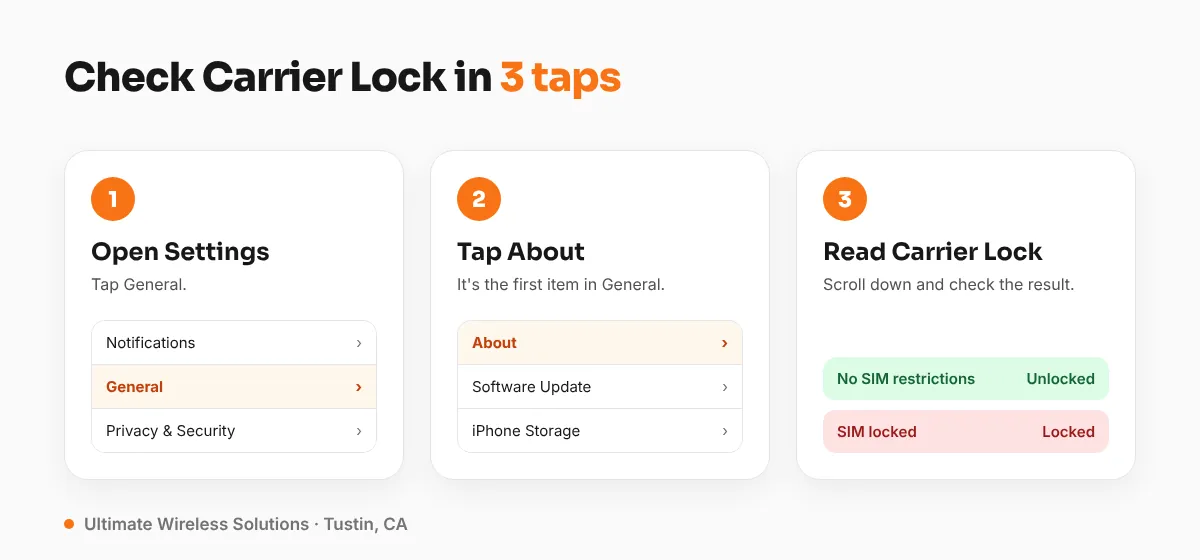
The Carrier Lock line has been part of iOS for years, so it shows up on the iPhone 17, iPhone Air and older models running current software like iOS 26. If you don't see it on an older phone, update iOS and check again.
What "No SIM restrictions" does and doesn't mean
"No SIM restrictions" only tells you about the carrier lock. It means the phone will accept a SIM or eSIM from another compatible carrier. It doesn't tell you anything about these other locks, which trip people up all the time:
- Activation Lock (Find My). This is tied to the owner's Apple Account, not the carrier. A phone can be fully carrier unlocked and still be Activation Locked, which makes it unusable for anyone else.
- A blocked or blacklisted IMEI. If a phone was reported lost or stolen, or the bill went unpaid, carriers can block it from their networks even if the phone itself is unlocked.
- Your screen passcode. The lock screen has nothing to do with carriers. "Unlocking" a passcode and unlocking a carrier are completely different things.
- An unpaid device balance. A phone still on an installment plan is usually carrier locked until it's paid off.
That's why our phone unlocking service is clear that a carrier unlock doesn't remove Activation Lock, Google FRP, screen passcodes or blacklist entries.
Other ways to tell if your iPhone is unlocked
The Settings check is enough for most people. If you want a second opinion, or you're looking at a phone you can't fully access, try one of these.
Try a SIM or eSIM from a different carrier
Borrow a SIM card from someone on a different carrier, turn off your iPhone, swap the SIM and turn it back on. If it connects and you can make a call, it's unlocked. If you get "SIM not supported" or "No SIM," it's probably locked.
iPhone 14 and later models sold in the US don't have a SIM tray, so this test means adding an eSIM from another carrier instead. Some carriers offer free eSIM trials, which make this easier.
Ask your carrier
Your carrier can look up the phone by its IMEI and tell you whether it's locked and whether it's eligible for an unlock. Most carriers also show this in their app or online account.
Check the IMEI
Find the IMEI by dialing *#06# or going to Settings > General > About. Online IMEI checkers can give you a hint about lock status, but their accuracy varies, so treat the result as a clue rather than proof. You can also send us a request through our IMEI check page, and a staff member reviews it before anything is run or charged.
Why your iPhone says "SIM not supported"
"SIM not supported" means the iPhone won't accept the SIM that's in it. At our Tustin shop, the most common reason by far is that the phone is still locked to a different carrier. Other causes include:
- The unlock hasn't finished. If your carrier approved an unlock but you don't have another SIM to insert, Apple says to back up the iPhone, erase it, then restore it from the backup to complete the process.
- A deactivated or damaged SIM. An old SIM from a closed account, or a scratched card, can trigger the same message. An eSIM that was deleted or never fully activated can too.
- A hardware fault. Less often, a drop or liquid damage affects the SIM reader or related parts. If the message keeps coming back on more than one carrier, or the phone also has weak signal, our antenna and signal repair team can test it.
How to check if a Samsung or Android phone is unlocked
On most recent Samsung Galaxy phones, go to Settings > Connections > More connection settings and look for the network unlock status. It will say "Unlocked" or "Locked." Menu names can differ slightly by model and carrier.
On other Android phones, try this: open your mobile network settings, find Network operators and turn off Select automatically. If you only see one carrier in the list, the phone is probably locked. If you see several, it's probably unlocked. Testing a SIM from another carrier works on Android too. If your Galaxy has SIM or signal trouble after switching, our Samsung phone repair technicians can take a look.
My iPhone is locked. How do I unlock it?
According to Apple's carrier unlock guide, only your current carrier can unlock your iPhone. Most carriers want to see the phone paid off, the account in good standing and the phone not reported lost or stolen. Many also require the phone to have been active on their network for a while.
Those rules vary by carrier and they do change. In early 2026, for example, the FCC let Verizon drop its automatic 60-day unlock and follow industry guidelines instead, which tie unlocking to a year of prepaid service or the end of a postpaid contract. Check your carrier's current policy before you plan a switch.
Once the carrier confirms the unlock, finish it like this:
- 1Using a SIM card from another carrier: remove the old SIM, insert the new one and let the phone activate.
- 2Using an eSIM: set up the new carrier's eSIM in Settings > Cellular.
- 3No other SIM yet: back up the iPhone, erase it, then restore it from your backup.
- 4Confirm it worked: go back to Settings > General > About and make sure Carrier Lock now says "No SIM restrictions."
If you'd like help, you can submit a carrier unlock inquiry on our phone unlocking page. Our staff reviews each request by hand and replies by email with eligibility, price and timing before any work or payment. We only process unlocks for phones you own, and we don't bypass passcodes, Activation Lock or blacklists.
Why unlock status matters when you sell or buy a used iPhone
Carrier status is one of the details we look at whenever someone brings in a phone to sell. Our cash for phones page lists carrier status and account-lock status among the things that affect an offer, and an unlocked iPhone can go to a buyer on any carrier.
If you're buying a used iPhone, check three things before you pay: Carrier Lock in Settings, that Find My is turned off, and the IMEI. If you're selling, our guide to selling your phone for cash walks through how to prepare it.
When to bring it to a pro
Most unlock questions can be settled in Settings. Bring the phone in if:
- Carrier Lock says "No SIM restrictions," but you still get SIM errors or No Service with more than one carrier.
- Signal problems started after a drop, liquid exposure or an earlier repair.
- The SIM tray is stuck or bent, or an eSIM won't install after several tries.
- You're about to buy a used iPhone and want to know if it's locked, blocked or Activation Locked before money changes hands.
- The phone has other problems too, and you're deciding whether to repair it or move on. Our guide on whether to repair your iPhone or upgrade can help.
iPhone unlock FAQ
Does "No SIM restrictions" mean my iPhone is unlocked?
Yes. It means the iPhone isn't carrier locked and should work with any compatible carrier. It doesn't tell you whether Activation Lock is on or whether the IMEI is blocked.
How can I tell if my iPhone is unlocked without a SIM card?
Go to Settings > General > About and look at Carrier Lock. You don't need to insert a different SIM to read it.
Can I check if an iPhone is unlocked with the IMEI?
Yes. Your carrier can look up lock status by IMEI, and online IMEI checkers can give you a hint. Third-party results vary in accuracy, so the Settings check or your carrier is more reliable.
Why does my iPhone say SIM not supported?
Usually the iPhone is locked to a different carrier. It can also mean an approved unlock hasn't finished, the SIM or eSIM is deactivated or damaged, or less often a hardware problem.
Can Apple unlock my iPhone?
No. Apple says only your current carrier can unlock your iPhone. Once the carrier approves it, insert the new SIM or set up an eSIM to finish.
Does a factory reset unlock an iPhone?
No. Erasing an iPhone removes your data, not the carrier lock. The one exception is after your carrier approves an unlock: if you don't have another SIM, Apple says backing up, erasing and restoring finishes the process.
Phone unlocking help in Tustin and Orange County
Still not sure whether your iPhone is unlocked, or getting SIM errors after a switch? Bring it to Ultimate Wireless Solutions at 18062 Irvine Blvd Suite 207, Tustin, CA 92780, or call (949) 300-8898. We help customers across Tustin, Irvine, Santa Ana, Orange, Anaheim, Costa Mesa, Newport Beach, Mission Viejo and Lake Forest with iPhone repair, phone unlocking and selling old phones. Every phone is different, so call or get a free quote, or book an appointment.